
The EX60 Is Here! Call our Sales Team at 603-730-6201 to schedule a test drive & experience Volvo's newest fully electric SUV.
Hours
- Monday 9AM-7PM
- Tuesday 9AM-7PM
- Wednesday 9AM-7PM
- Thursday 9AM-7PM
- Friday 9AM-6PM
- Saturday 9AM-5PM
- Sunday Closed
When it's time to update the navigation maps in your Volvo, this is the place to be! Roads in Nashua, and N.H. in general, are constantly changing so it is best to be prepared by having the most-up-to date map software available. In order to get you to the correct information for your vehicle, there are different steps that you must go through.
Your first step is to go to this website: //volvo.custhelp.com/app/answers/detail/a_id/9408/~/update-the-usb-maps-in-my-volvo
- Then, identify which system you are using:

- In our case, we are showing you how to update the maps in a 2017 Volvo S60 Inscription. We will click on the upper left image.
- This then brings us to a separate page that pops out in a new tab: //volvo.custhelp.com/app/answers/detail/a_id/9156
- Scrolling down towards the middle of the page you'll see the two links that we are looking for:
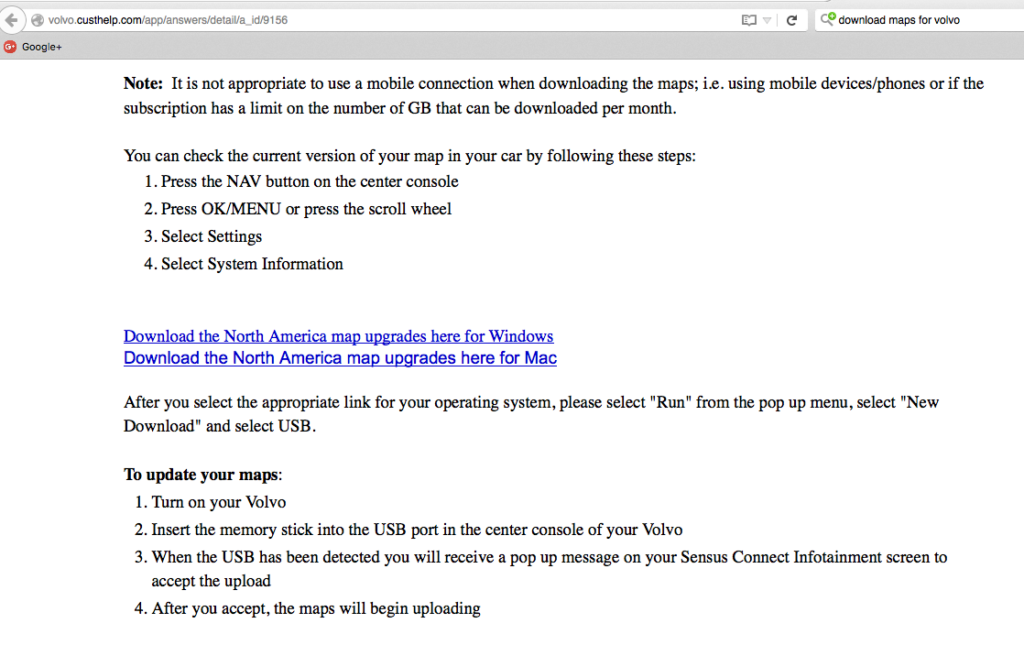
- Click to download whichever suits your needs. You'll see that there are 2 blue links. One link is for a Windows computer, and the other is for a Mac.
- You'll select "Run" -> "New Download" -> "USB" -> This step then takes 2-3 hours depending on your internet connection. Your maps are now being downloaded to the USB.
- Once the download is complete, you'll turn on your Volvo.
- Insert your USB into the USB port in your Volvo.
- You'll receive a pop-up message on your screen. Select that you accept the upload.
- Once you click 'accept,' your download will begin.
